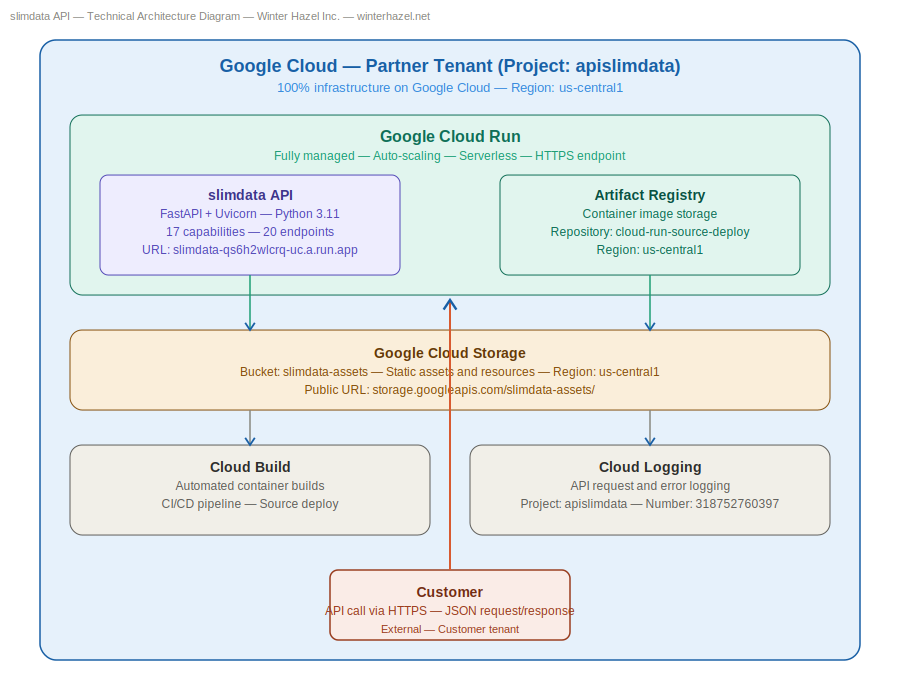
The Python Data Optimizer API, developed by Winter Hazel Inc., intelligently identifies inefficient data types within your Python code and databases, replacing them with the most compact, efficient types that accurately retain your data.
Input: Send Python data structures, code snippets, or database connection strings encapsulated in JSON format via an API call.
Output: Receive optimized data along with a detailed savings report showcasing the original size, optimized size, and total bytes saved.
This feature connects directly to your database and scans tables and columns for oversized data types, returning precise recommendations along with bytes saved per row:
{"status":"success","result":{"optimized":[1000,2000,3000,4000,5000],"savings":{"original_type":"list","optimized_type":"array.h","original_size":40,"optimized_size":10,"saved":"30 bytes"},"type_detected":"list"}}
curl --location --request POST 'https://zylalabs.com/api/12866/python+data+optimizer+api/25666/optimize+data' --header 'Authorization: Bearer YOUR_API_KEY'

--data-raw '{"data": [1000, 2000, 3000, 4000, 5000]}'
{"status":"success","results":[{"optimized":[1000,2000,3000],"savings":{"original_type":"list","optimized_type":"array.h","original_size":24,"optimized_size":6,"saved":"18 bytes"},"type_detected":"list"},{"optimized":[1.5,2.5,3.5],"savings":{"original_type":"list","optimized_type":"array.f","original_size":24,"optimized_size":12,"saved":"12 bytes"},"type_detected":"list"}]}
curl --location --request POST 'https://zylalabs.com/api/12866/python+data+optimizer+api/25670/optimize+batch' --header 'Authorization: Bearer YOUR_API_KEY'

--data-raw '{"data_list": [[1000, 2000, 3000], [1.5, 2.5, 3.5]]}'
{"original_type":"list","optimized_type":"list","pattern_applied":"duplicates_removed — list preserved","original_size":88,"optimized_size":88,"saved":"0 bytes","optimized":["hello","world","python"]}
curl --location --request POST 'https://zylalabs.com/api/12866/python+data+optimizer+api/25671/optimize+structural' --header 'Authorization: Bearer YOUR_API_KEY'

--data-raw '{"data": ["hello", "world", "hello", "python"]}'
{"status":"success","results":[{"original_type":"list","optimized_type":"list","pattern_applied":"duplicates_removed — list preserved","original_size":88,"optimized_size":88,"saved":"0 bytes","optimized":["hello","world"]},{"original_type":"list","optimized_type":"tuple","pattern_applied":"list_to_tuple — immutable conversion","original_size":120,"optimized_size":80,"saved":"40 bytes","optimized":[1,2,3,4,5]}]}
curl --location --request POST 'https://zylalabs.com/api/12866/python+data+optimizer+api/25672/optimize+structural+batch' --header 'Authorization: Bearer YOUR_API_KEY'

--data-raw '{"data_list": [["hello", "world", "hello"], [1, 2, 3, 4, 5]]}'
{"status":"optimized","sparsity_ratio":87.5,"original_format":"dense matrix","optimized_format":"CSR sparse matrix","original_size":128,"optimized_size":32,"saved":"96 bytes","non_zero_elements":2,"total_elements":16,"compressed_data":{"format":"CSR","shape":[4,4],"rows":[0,2],"cols":[3,1],"values":[5,3],"total_elements":16,"stored_elements":2}}
curl --location --request POST 'https://zylalabs.com/api/12866/python+data+optimizer+api/25673/optimize+sparse+matrix' --header 'Authorization: Bearer YOUR_API_KEY'

--data-raw '{"matrix": [[0,0,0,5],[0,0,0,0],[0,3,0,0],[0,0,0,0]]}'
{"status":"success","results":[{"status":"optimized","sparsity_ratio":87.5,"original_format":"dense matrix","optimized_format":"CSR sparse matrix","original_size":128,"optimized_size":32,"saved":"96 bytes","non_zero_elements":2,"total_elements":16,"compressed_data":{"format":"CSR","shape":[4,4],"rows":[0,2],"cols":[3,1],"values":[5,3],"total_elements":16,"stored_elements":2}},{"status":"not_sparse","sparsity_ratio":0.0,"message":"Matrix is only 0.0% sparse. Optimization not needed.","original_size":32}]}
curl --location --request POST 'https://zylalabs.com/api/12866/python+data+optimizer+api/25674/optimize+sparse+matrix+batch' --header 'Authorization: Bearer YOUR_API_KEY'

--data-raw '{"matrices": [[[0,0,0,5],[0,0,0,0],[0,3,0,0],[0,0,0,0]],[[1,2],[3,4]]]}'
{"status":"success","total_leaks_found":2,"severity":{"high":1,"medium":1,"low":0},"leaks":[{"type":"global_list","variable":"logs","line":3,"description":"Global list that grows indefinitely","recommendation":"Move 'logs' inside a function or class. Clear it periodically."},{"type":"large_global","variable":"logs","line":1,"description":"Global list 'logs' detected","recommendation":"Consider moving 'logs' inside a function or use weak references."}],"summary":"Found 2 potential memory leaks. 1 high severity, 1 medium severity, 0 low severity."}
curl --location --request POST 'https://zylalabs.com/api/12866/python+data+optimizer+api/25691/analyze+memory+leak' --header 'Authorization: Bearer YOUR_API_KEY'

--data-raw '{"code": "logs = []\ndef add_log(msg):\n    logs.append(msg)"}'
{"status":"success","total_recommendations":3,"recommendations":[{"type":"list_comprehension","line":2,"description":"List comprehension detected — loads all data into memory at once.","recommendation":"Convert to generator expression by replacing [] with ().","example_before":"[x for x in data]","example_after":"(x for x in data)","memory_impact":"High — saves memory proportional to data size"},{"type":"function_with_list","line":3,"function":"sum","description":"List comprehension passed to sum() — unnecessary memory allocation.","recommendation":"Replace list comprehension with generator inside sum().","example_before":"sum([x for x in data])","example_after":"sum(x for x in data)","memory_impact":"Very High — generator never builds the full list in memory"},{"type":"list_comprehension","line":3,"description":"List comprehension detected — loads all data into memory at once.","recommendation":"Convert to generator expression by replacing [] with ().","example_before":"[x for x in data]","example_after":"(x for x in data)","memory_impact":"High — saves memory proportional to data size"}],"summary":"Found 3 opportunities to use generator expressions.","benefit":"Generator expressions process data one item at a time — saving significant memory on large datasets."}
curl --location --request POST 'https://zylalabs.com/api/12866/python+data+optimizer+api/25692/generator+advisor' --header 'Authorization: Bearer YOUR_API_KEY'

--data-raw '{"code": "numbers = [1,2,3,4,5]\nsquares = [x * x for x in numbers]\ntotal = sum([x * x for x in range(1000000)])"}'
{"status":"success","total_recommendations":1,"recommendations":[{"type":"multiple_booleans","boolean_variables":["is_active","is_admin","is_verified","is_premium","has_access","can_edit"],"count":6,"description":"Found 6 boolean variables that can be combined into one integer.","recommendation":"Replace multiple boolean variables with a single bitwise integer flag.","example_before":"is_active = True\nis_admin = True\nis_verified = True","example_after":"\nclass Flags:\n IS_ACTIVE = 1\n IS_ADMIN = 2\n IS_VERIFIED = 4\n IS_PREMIUM = 8\n HAS_ACCESS = 16\n CAN_EDIT = 32\n\n# Set flags\nflags = 0\nflags |= Flags.IS_ACTIVE\nflags |= Flags.IS_ADMIN\n\n# Check flags\nis_set = bool(flags & Flags.IS_ACTIVE)\n","memory_impact":"Saves 140 bytes — replacing 6 booleans with 1 integer"}],"savings":{"boolean_count":6,"original_size":168,"optimized_size":28,"saved":"140 bytes"},"summary":"Found 1 opportunities to use bitwise flags.","benefit":"Bitwise flags store multiple boolean states in one integer — saving memory and improving performance."}
curl --location --request POST 'https://zylalabs.com/api/12866/python+data+optimizer+api/25693/bitwise+optimizer' --header 'Authorization: Bearer YOUR_API_KEY'

--data-raw '{"code": "is_active = True\nis_admin = False\nis_verified = True\nis_premium = False\nhas_access = True\ncan_edit = False"}'
{"status":"success","total_recommendations":3,"recommendations":[{"type":"file_open","line":3,"description":"File opened with standard open() — loads entire file into memory.","recommendation":"Use mmap for large files to avoid loading entire file into memory.","example_before":"\nwith open('large_file.bin', 'rb') as f:\n data = f.read()\n","example_after":"\nimport mmap\nwith open('large_file.bin', 'rb') as f:\n with mmap.mmap(f.fileno(), 0, access=mmap.ACCESS_READ) as mm:\n data = mm[0:1024] # Read only what you need\n","memory_impact":"High — reads only required bytes instead of entire file"},{"type":"numpy_file_load","line":5,"description":"numpy.loadtxt() loads entire file into memory.","recommendation":"Use numpy.memmap for large arrays to avoid full file loading.","example_before":"\nimport numpy as np\ndata = np.loadtxt('large_array.txt')\n","example_after":"\nimport numpy as np\ndata = np.memmap('large_array.bin', dtype='float32', mode='r')\n","memory_impact":"Very High — numpy memmap reads only accessed portions"},{"type":"pandas_file_load","line":6,"description":"pandas.read_csv() loads entire file into memory.","recommendation":"Use chunksize parameter to process file in smaller pieces.","example_before":"\nimport pandas as pd\ndf = pd.read_csv('large_file.csv')\n","example_after":"\nimport pandas as pd\nfor chunk in pd.read_csv('large_file.csv', chunksize=10000):\n process(chunk) # Process one chunk at a time\n","memory_impact":"Very High — processes file in chunks instead of loading all at once"}],"summary":"Found 3 opportunities to use memory mapping.","benefit":"Memory mapping reads only the parts of a file you need — saving significant memory on large files.","best_for":["Files larger than 100 MB","Binary data files","Large numpy arrays","Large CSV or data files"]}
curl --location --request POST 'https://zylalabs.com/api/12866/python+data+optimizer+api/25694/memory+mapper' --header 'Authorization: Bearer YOUR_API_KEY'

--data-raw '{"code": "import numpy as np\nimport pandas as pd\nfile = open('large_data.bin', 'rb')\ndata = file.read()\narray = np.loadtxt('large_array.txt')\ndf = pd.read_csv('large_file.csv')"}'
| Header | Description |
|---|---|
Authorization
|
[Required] Should be Bearer access_key. See "Your API Access Key" above when you are subscribed. |
No long-term commitment. Upgrade, downgrade, or cancel anytime. Free Trial includes up to 50 requests.
The Optimize Data endpoint returns a JSON object containing the optimized data structure, a savings report detailing the original and optimized sizes, and the type of data detected.
The key fields in the response include "optimized" (the optimized data structure), "savings" (an object with "original_type," "optimized_type," "original_size," "optimized_size," and "saved"), and "type_detected" (the data type identified).
The response data is organized in a JSON format with a "status" field indicating success or failure, followed by a "result" object that contains the optimized data and savings report.
The Optimize Data endpoint provides information on the optimized data structure, the original and optimized sizes, the amount of memory saved, and the detected data type.
Users can customize their data requests by sending different Python data structures, code snippets, or database connection strings encapsulated in JSON format, allowing for tailored optimization based on their specific needs.
In the response, "original_size" indicates the size of the data before optimization, "optimized_size" shows the size after optimization, and "saved" quantifies the memory reduction achieved through the optimization process.
Typical use cases include reducing memory usage in Python applications, optimizing database column types to lower storage costs, identifying memory leaks, and compressing sparse matrices for machine learning tasks.
Data accuracy is maintained by intelligently identifying and replacing inefficient data types while ensuring that the optimized types accurately represent the original data, thus preserving its integrity during the optimization process.
The API can optimize various Python data structures, including lists, arrays, dictionaries, and sparse matrices. It also supports code snippets and database connection strings, allowing for a wide range of optimization scenarios.
The API can flatten deeply nested lists into flat arrays, which reduces complexity and memory usage. This feature is particularly useful for optimizing data structures commonly found in machine learning tasks.
The "type_detected" field indicates the original data type identified by the API before optimization. This helps users understand what type of data was processed and ensures they can verify the optimization results.
Yes, the API supports optimization for various database systems, including PostgreSQL, MySQL, SQLite, MongoDB, and SQL Server. It provides tailored recommendations for each system to enhance data storage efficiency.
If the input data is already optimized, the API will still return a savings report indicating that no further optimization is necessary. This helps users confirm the efficiency of their existing data structures.
The API intelligently identifies and replaces inefficient data types while ensuring that the optimized types accurately represent the original data. This process maintains data integrity and prevents loss of information.
Converting lists to sets eliminates duplicate values, saving memory, while using tuples provides immutability, which can reduce memory usage by approximately 40 bytes per structure. Both conversions enhance data efficiency.
The savings report details the original size, optimized size, and total bytes saved. Users can use this information to assess the effectiveness of the optimization and make informed decisions about data management.
To obtain your API key, first sign in to your account and navigate to the API you want to use. From the API's Pricing section, choose a plan and complete the subscription process. Once subscribed, return to the API page and you will see your API Access Key displayed at the top of the documentation page. You can use this key to authenticate your requests.
You can’t switch APIs during the free trial. If you subscribe to a different API, your trial will end and the new subscription will start as a paid plan.
The free trial lasts for 7 days and allows you to make up to 50 API requests.
No, the free trial is available only once, so we recommend using it on the API that interests you the most. Most of our APIs offer a free trial, but some may not include this option.
Yes. If the API offers a free trial, you will see a "Free 7-Day Trial" option in its Pricing section. The trial lasts for 7 days and allows up to 50 API requests, enabling you to evaluate the API before subscribing to a paid plan.
Zyla API Hub is like a big store for APIs, where you can find thousands of them all in one place. We also offer dedicated support and real-time monitoring of all APIs. Once you sign up, you can pick and choose which APIs you want to use. Just remember, each API needs its own subscription. But if you subscribe to multiple ones, you'll use the same key for all of them, making things easier for you.
You can monitor your API usage through the response headers included with every request:
x-zyla-api-calls-monthly-used: Shows the total number of API requests you have used during the current billing period.
x-zyla-api-calls-monthly-remaining: Shows the number of API requests you have remaining for the current billing period.
Yes, you can cancel your subscription at any time. Simply go to the Pricing section of the API you're subscribed to and click the "Unsubscribe" button.
Please note that upgrades, downgrades, and cancellations take effect immediately. Once your subscription is canceled, access to the service will end immediately, regardless of any remaining API calls in your quota.
Please have a look at our Refund Policy: https://zylalabs.com/terms#refund
Service Level:
100%
Response Time:
3,110ms
Service Level:
100%
Response Time:
4,492ms
Service Level:
100%
Response Time:
233ms
Service Level:
100%
Response Time:
150ms
Service Level:
100%
Response Time:
9,164ms
Service Level:
100%
Response Time:
1,405ms
Service Level:
100%
Response Time:
472ms
Service Level:
100%
Response Time:
2,921ms
Service Level:
100%
Response Time:
20,002ms
Service Level:
100%
Response Time:
6,655ms
Service Level:
100%
Response Time:
3,110ms
Service Level:
100%
Response Time:
4,492ms
Service Level:
100%
Response Time:
233ms
Service Level:
100%
Response Time:
150ms
Service Level:
100%
Response Time:
9,164ms
Service Level:
100%
Response Time:
1,405ms
Service Level:
100%
Response Time:
472ms
Service Level:
100%
Response Time:
2,921ms
Service Level:
100%
Response Time:
20,002ms
Service Level:
100%
Response Time:
6,655ms