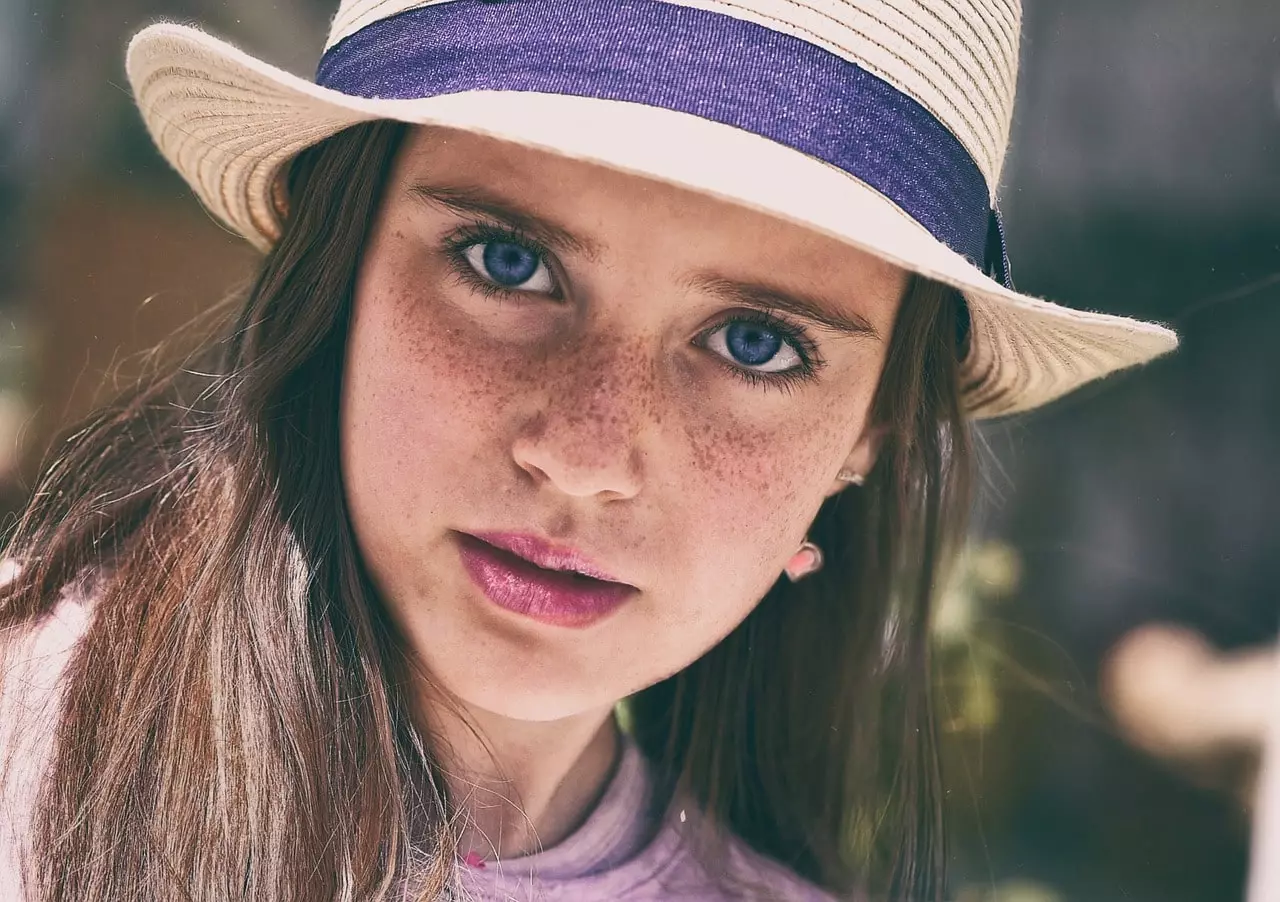
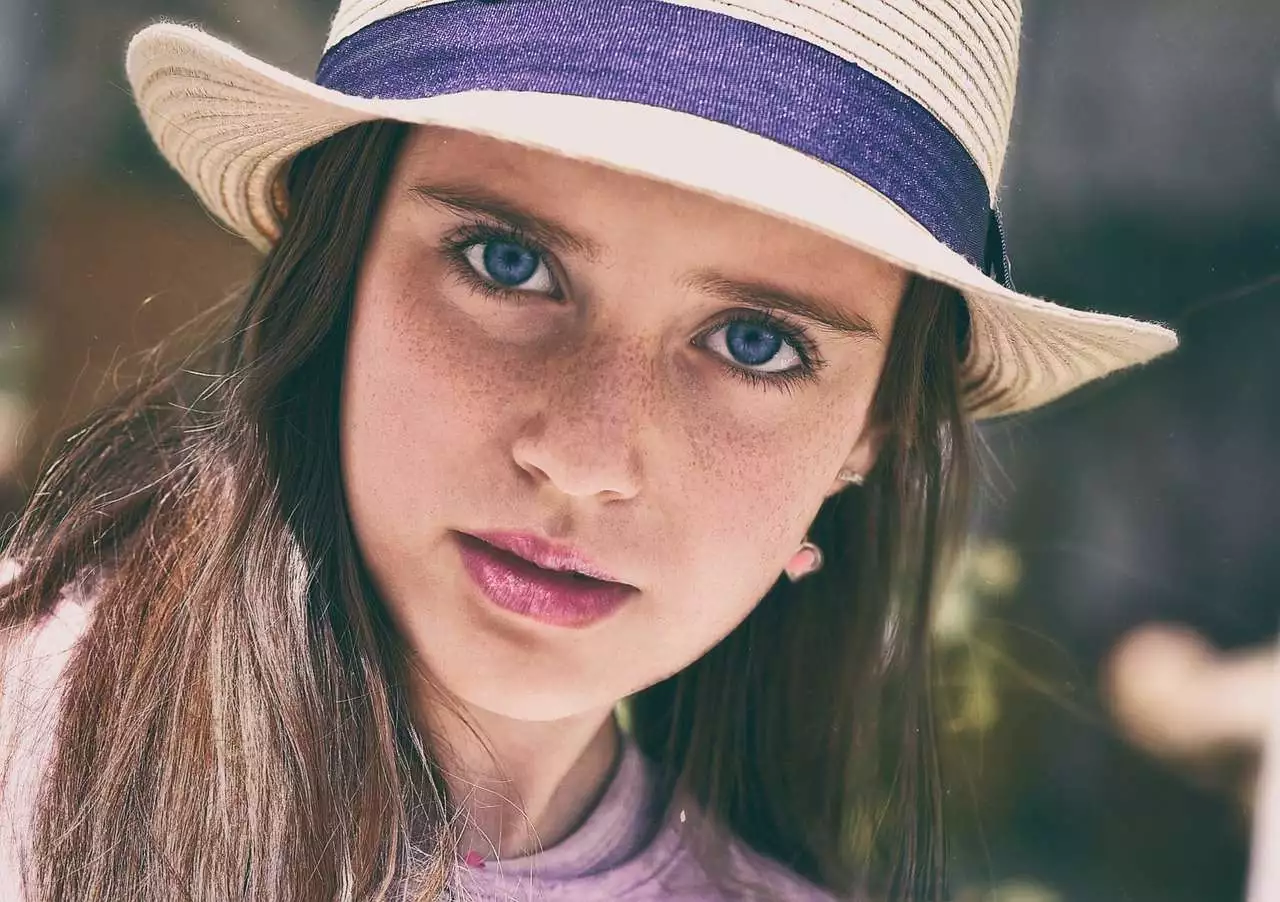
Our AI Skin Beauty API leverages advanced AI technology to automatically enhance the skin of faces and bodies in images, ensuring a natural and realistic texture. This API effectively smooths and beautifies skin while retaining its unique characteristics, making it ideal for beauty applications, photo editing software, and social media platforms. By seamlessly integrating our API, users can achieve professional-grade skin enhancements with minimal effort. Perfect for improving portraits and full-body photos alike, our AI Skin Beauty API provides high-quality, natural-looking results that elevate the visual appeal of any image. Enhance your application's capabilities and user experience with the power of AI-driven skin beautification.
Enhance facial and body skin with our AI Skin Beauty API, ensuring natural texture while improving overall appearance.
JPEG JPG PNG.| Field | Required | Type | Scope | Default | Description |
|---|---|---|---|---|---|
image |
YES | file |
|||
retouch_degree |
NO | float |
[0, 1.5] | 1.0 |
Dermabrasion intensity. The higher the value, the less visible the skin texture. |
whitening_degree |
NO | float |
[0, 1.5] | 1.0 |
Whitening strength. The higher the value, the whiter the skin. |
AI Skin Beauty - Endpoint Features
| Object | Description |
|---|---|
Request Body |
[Required] File Binary |
retouch_degree |
Optional Dermabrasion intensity. The higher the value, the less visible the skin texture. Scope: [0, 1.5] |
whitening_degree |
Optional Whitening strength. The higher the value, the whiter the skin. Scope: [0, 1.5] |
{"data":{"image_url":"https:\/\/ai-result-rapidapi.ailabtools.com\/faceBody\/retouchSkin\/2024-11-20\/140354-38eefddd-a25a-aaf4-796a-5f89f78eb0cb-1732111434.jpg"},"error_code":0,"error_detail":{"status_code":200,"code":"","code_message":"","message":""},"log_id":"933E923B-96D4-567D-92B5-58F4D302DC8F","request_id":"933E923B-96D4-567D-92B5-58F4D302DC8F"}
    curl --location 'https://zylalabs.com/api/4446/ai+skin+beauty+api/5459/ai+skin+beauty' \
    --header 'Content-Type: application/json' \
    --form 'image=@"FILE_PATH"'
| Header | Description |
|---|---|
Authorization
|
[Required] Should be Bearer access_key. See "Your API Access Key" above when you are subscribed. |
No long-term commitment. Upgrade, downgrade, or cancel anytime.
Professional retouching: It can be used in professional photography scenes such as studio, e-commerce, and live picture broadcasting to quickly perform beauty retouching and improve work efficiency by using intelligent beauty algorithm. Beauty shooting: Used in entertainment, life and other scenes to improve the beauty of characters.
Preserve skin texture: Use deep learning algorithms to achieve precise skin beauty with smooth and textured skin. Keep the background stable: Retouch only the bare skin area, without affecting the background area. Support multi-people skin beautification: Support multi-people skin beautification in a single image.
The AI Skin Beauty API returns an object containing the processed image data. The key field in the response is `image_url`, which provides the URL of the enhanced image. This URL is temporary and valid for 24 hours.
The endpoint accepts the `image` parameter (required) for the input image, and optional parameters `retouch_degree` and `whitening_degree`, which control the intensity of skin smoothing and whitening, respectively.
Users can customize requests by adjusting the optional parameters `retouch_degree` (range 0 to 1.5) for skin texture visibility and `whitening_degree` (range 0 to 1.5) for skin brightness, allowing for tailored enhancements.
The response data is structured as a JSON object. It includes fields like `request_id`, `log_id`, `error_code`, and a `data` object containing the `image_url` of the processed image.
In the response, `error_code` indicates the success or failure of the request (0 means success), while `image_url` provides the link to the enhanced image. Other fields like `error_msg` give details on any issues encountered.
The API provides information on the enhanced image, including the URL for the processed image. It also includes error codes and messages to help diagnose issues with the request.
Typical use cases include professional photo retouching, enhancing images for e-commerce, and beautifying portraits for social media. The API is designed to improve the visual appeal of both facial and body images.
Users can download the enhanced image from the `image_url` provided in the response. It’s important to do this within 24 hours, as the URL expires after that period.
Please have a look at our Refund Policy: https://zylalabs.com/terms#refund
To obtain your API key, you first need to sign in to your account and subscribe to the API you want to use. Once subscribed, go to your Profile, open the Subscription section, and select the specific API. Your API key will be available there and can be used to authenticate your requests.
You can’t switch APIs during the free trial. If you subscribe to a different API, your trial will end and the new subscription will start as a paid plan.
If you don’t cancel before the 7th day, your free trial will end automatically and your subscription will switch to a paid plan under the same plan you originally subscribed to, meaning you will be charged and gain access to the API calls included in that plan.
The free trial ends when you reach 50 API requests or after 7 days, whichever comes first.
No, the free trial is available only once, so we recommend using it on the API that interests you the most. Most of our APIs offer a free trial, but some may not include this option.
Yes, we offer a 7-day free trial that allows you to make up to 50 API calls at no cost, so you can test our APIs without any commitment.
Zyla API Hub is like a big store for APIs, where you can find thousands of them all in one place. We also offer dedicated support and real-time monitoring of all APIs. Once you sign up, you can pick and choose which APIs you want to use. Just remember, each API needs its own subscription. But if you subscribe to multiple ones, you'll use the same key for all of them, making things easier for you.
Service Level:
100%
Response Time:
1,127ms
Service Level:
100%
Response Time:
800ms
Service Level:
100%
Response Time:
465ms
Service Level:
100%
Response Time:
0ms
Service Level:
100%
Response Time:
920ms
Service Level:
100%
Response Time:
269ms
Service Level:
100%
Response Time:
0ms
Service Level:
100%
Response Time:
317ms
Service Level:
100%
Response Time:
280ms
Service Level:
98%
Response Time:
0ms
Service Level:
50%
Response Time:
1,420ms
Service Level:
50%
Response Time:
1,117ms
Service Level:
50%
Response Time:
1,365ms
Service Level:
50%
Response Time:
4,717ms
Service Level:
100%
Response Time:
3,306ms
Service Level:
50%
Response Time:
3,715ms
Service Level:
100%
Response Time:
3,718ms
Service Level:
100%
Response Time:
2,868ms
Service Level:
100%
Response Time:
3,029ms
Service Level:
100%
Response Time:
2,649ms